Add a Feature
Start the Day Your Way: Turning Playlists into Alarms on YouTube Music
ROLE
UX Designer
EXPERTISE
UX/UI Design
YEAR
2024

Overview
This project explores enhancing YouTube Music by introducing features that make playlists more adaptive to users' lifestyles. Through research and ideation, I focused on designing tools that support routine-building and playlist management, making music more intuitive, timely, and personal.
Background
YouTube Music is a leading streaming platform that allows users to listen to music, watch videos, and discover new content.
Problem
While it offers a rich selection of playlists and recommendations, its integration into users’ daily routines remains limited. Many users rely on music not only for entertainment but also to motivate their mornings and improve their daily habits.
Research Goal
The goal of this research is to identify opportunities to improve playlist sorting and organization by analyzing common patterns, strengths, and weaknesses in leading music streaming platforms.
Objectives
Identify common patterns and usability issues.
Analyze how top music platforms improve users experience with playlists.
Evaluate strengths and weaknesses of current solutions.
Find opportunities to improve sorting and organization.
User Interview
I conducted live task-based user interviews, observing how participants created and managed playlists across Spotify and YouTube Music to capture real-time pain points and preferences.
All participants preferred Spotify for its convenience (rated 5/5).
YouTube Music was overwhelming at first glance due to too many buttons.
Participants wanted a drag-and-drop feature for easier song arrangement.
Users found it inconvenient to add songs on YouTube Music because it required changing pages.
Playlists are critical for quick access to favorite songs and for matching users' moods/vibes.


Affinity Map
Users preferred Spotify for its clean interface and smooth playlist features like drag-and-drop and in-page editing, making music organization fast and effortless.

Participants found YouTube Music overwhelming and inconvenient, with too many buttons and extra steps that made managing playlists feel frustrating.

User Persona


User Flows
Task #1: Move multiple songs from a playlist to a different playlist
The new flow allows users to tap and select multiple songs from any playlist, then simply drag them into a new or existing playlist. A confirmation toast gives feedback, and users can undo the action if needed.

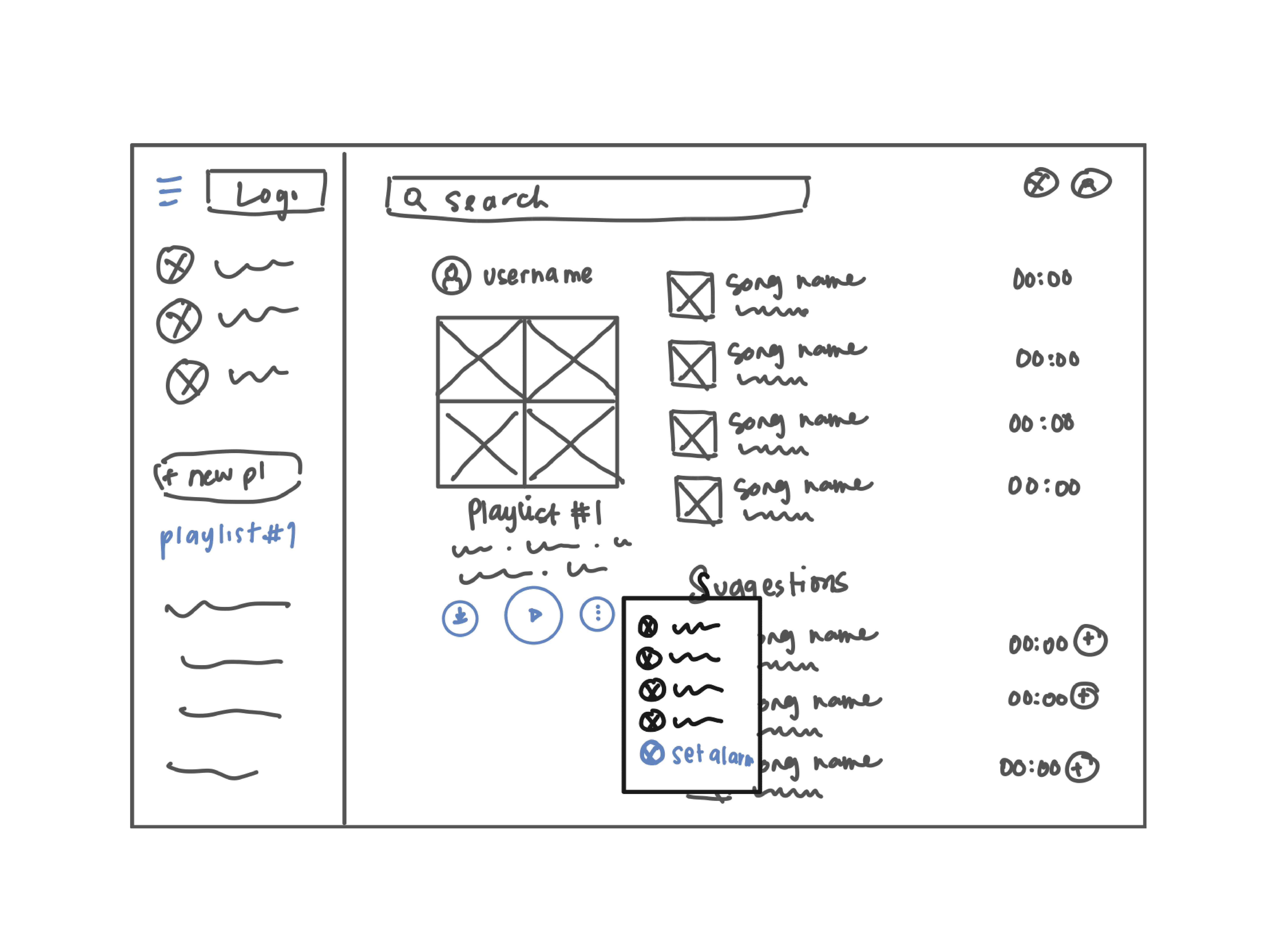
Task #2: Set a timer/reminder for a playlist to play in the morning
"I designed a feature that allows users to schedule a playlist to start playing at a specific time — just like setting an alarm. From the playlist menu, users can tap ‘Set Timer’, choose a time, and select whether it repeats on specific days."

Inspired by common file management behaviors, I sketched out a low-fidelity interaction where users could tap to select multiple songs, then drag and drop them into another playlist. The goal was to make organizing music as easy and intuitive as moving files on a desktop.

I sketched out a feature that allows users to schedule a playlist to play automatically at a set time, much like an alarm — but with their own music, not just a default ringtone


UI Design


Usability Testing
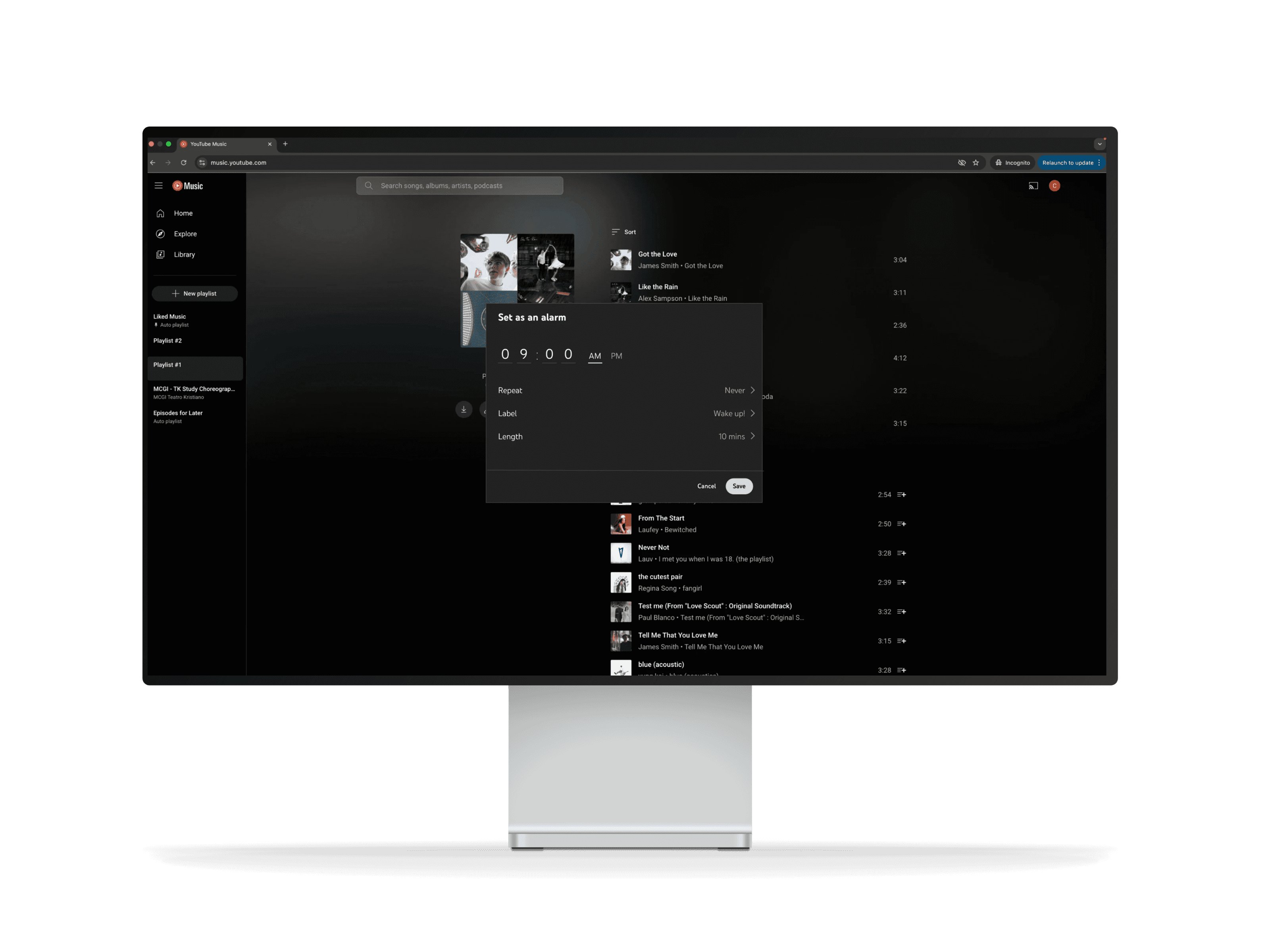
We tested a prototype feature that allows users to set a YouTube Music playlist as their morning alarm. The goal was to understand how intuitive this new functionality is, and identify points of confusion or friction.

Users frequently overlooked the "Set as Alarm" option because it was not visually prominent in the interface. Given that setting a playlist as an alarm is a key feature likely to be used regularly, it needs to be surfaced more clearly in the user flow. Improving its visibility not only supports ease of access but also reinforces the feature’s value and discoverability
Iteration
To address visibility issues, we moved the "Set as Alarm" option higher in the options list, making it easier for users to find and access quickly. This adjustment prioritizes a key action that many users are likely to use frequently, reducing friction and improving overall task efficiency.


Wrap up
This project emphasized the value of designing for everyday usability—especially in routines like waking up. By identifying friction in the alarm playlist customization flow and iterating based on real user feedback, we were able to streamline the experience and surface key features more clearly. Through thoughtful testing, visual hierarchy improvements, and simplified flows, we transformed a confusing setup into a user-friendly, personalized wake-up solution. This case study reinforces how even small UI decisions—like option placement or clearer labels—can significantly enhance user confidence and satisfaction.